
Stage Master
Define customer meeting stages and configure Bayesian engine parameters (SV, T, k) and Company Prior
Stage Master
Stage Master is the screen for defining customer sales meeting stages and configuring the Bayesian engine parameters for each stage.
All users can view stages, but creating, editing, deleting stages, and changing Company Prior settings is restricted to admin or super_user roles only.
Location: Sidebar → Settings → Stage Master
What is a Stage?
The sales process typically goes through several stages:
- Discovery — Identifying potential customers
- Qualification — Analyzing customer needs
- Proposal — Delivering solution proposals
- Negotiation — Negotiating price and terms
- Closing — Finalizing the contract
Each step is a stage, and Stage Master is where you configure them. Multiple meetings can occur within a single stage, and each meeting is recorded as a separate activity.
Let's first briefly discuss the meaning of stages used in EXAWin to aid your understanding, then explain the system usage.
Time Flows Differently in Sales: The Geometry of Conviction Created by Bayesian Probability and Log Weights
Any sales professional who works in the field intuitively knows this: "The weight of a first meeting at the discovery stage is completely different from a meeting at the final negotiation stage right before contract signing."
A customer smiling and showing positive reactions at the first meeting might simply be a matter of 'interest'. But when a customer shows positive signals at the final negotiation table, it becomes 'decisive evidence' that confirms the win. Unfortunately, conventional CRM and sales management systems treat both meetings flatly as '1 activity'. The data completely fails to capture the tension and momentum of the deal.
EXAWin introduces Bayesian Inference and Logarithmic Weighting as powerful weapons to translate this field intuition into mathematical logic within the system.
1. Bayesian Perspective: Updating the Weight of EvidenceThe essence of Bayesian probability is "updating our belief (probability) every time new evidence appears." Each time a sales representative meets with a customer and enters new information (Signal) into the system, the win probability is precisely recalibrated.
But as mentioned, not all evidence carries equal value. The destructive power of evidence must grow exponentially toward the later stages. To address this, we classified sales stages into Stages and assigned each stage a unique Stage Value (SV).
2. Why Logarithmic (Log) Weights?Rather than simply multiplying the Stage Value, we transform it using the natural logarithm () with the following formula to calculate the weight.
The adoption of logarithmic functions rather than linear multiples (1x, 2x, 3x...) in Bayesian reasoning involves very precise business calculations.
- Stability in early stages: At Development (Stage 1), a weight of is applied. This prevents the system from overreacting to noise or premature positive signals, keeping the probability from being inflated.
- Heavy amplification in later stages: At Proposal (Stage 3), approximately , and at Closing (Stage 5), approximately weight is multiplied. Decisive signals entering into the second half of the pipeline are converted into powerful impact quantities of 2x or more, strongly pushing the probability past the decision threshold.
- Controlled acceleration: If weights were simply multiplied as , the numbers in later stages would have exploded abnormally, destroying data reliability. The natural logarithm () has the property that the rate of increase slows as values grow, perfectly suppressing uncontrolled runaway while strongly reflecting the importance of later stages.
A system with this logic becomes not a surveillance tool that torments sales representatives, but a partner that proves their intuition. When a sales representative intuits "I definitely seized the winning momentum in this final meeting," the system likewise runs the powerful acceleration engine of to convert that intuition into near-99% data-driven conviction and project it onto the leader's dashboard. Conversely, negative meeting signals occurring in later stages are reflected with the same weight, providing advance warning of critical risks.
In conclusion, EXAWin's Stage system is the result of translating the eternal unwritten rule of sales — "the weight of a deal grows heavier over time" — into the most elegant and flawless language of mathematics.
For more related content, see the articles linked below.
BA02. [EXA Bayesian Inference] The Invisible Hand of Sales: A 60-Day Gamble
BA02. [Appendix 1] Bayesian Engine: Mathematical Alchemy for Managing Uncertainty
BA02. [Appendix 2] The Paradox of Silence: Information Entropy and Log-Weight Geometry
BA02. [Appendix 3] Sales Win Probability Decision System
Screen Layout
The screen is composed of a 2-panel layout:
- Left Panel — Registered stages table (list view, click to edit)
- Right Panel — Stage creation/editing form (tab switching: Stage Configuration / Company Prior)
Top Header
| Item | Description |
|---|---|
| Excel | Export stage list as an .xlsx file |
| α / β / Prior | Displays a summary of the Company Prior Probability |
Stage Table
All registered stages are displayed in a table format.
| Column | Description |
|---|---|
| Sort Order | Stage display order (number, unique value) |
| Active | Active status (green dot: active / gray dot: inactive) |
| Stage Name | Stage name (e.g., Discovery, Proposal, Negotiation) |
| SV | Stage Value — the sales value of this stage (positive number) |
| SWV (ln) | Stage Weighted Value — automatically calculated as 1 + ln(SV) (used internally by the Bayesian engine) |
| Physics (T/k) | Threshold (T) and Velocity (k) — decision physics parameters |
| Description | Stage description |
Clicking a table row loads the stage information into the right panel for editing.
Standard Stage Data
All stages and parameters (SV, T, k) in EXAWin are precisely calibrated standard data aligned with the Bayesian engine's mathematical framework. These values are not independent numbers but form an interconnected system with Prior (α/β), Signal Impact, and decision Impedance.
⚠️ Arbitrarily changing parameters will distort the posterior probability. The Bayesian engine performs chained calculations in the order
SV → SWV → Impact weight → α/β update → P(Win) → Impedance (T, k), so if any single value deviates from the framework, the reliability of the entire probability calculation collapses.
Standard Stage List
| Order | Stage Name | SV | SWV (auto-calculated) | T | k | Description |
|---|---|---|---|---|---|---|
| 1 | Discovery | 1.0 | 1.0000 | 0.35 | 5 | Prospecting and first contact |
| 2 | Qualification | 2.0 | 1.6931 | 0.40 | 7 | Need verification and fit assessment |
| 3 | Solution-Fit | 3.0 | 2.0986 | 0.45 | 7 | Solution fit verification and demo |
| 4 | Proposal | 4.0 | 2.3863 | 0.50 | 12 | Proposal delivery and pricing |
| 5 | Negotiation | 5.0 | 2.6094 | 0.55 | 11 | Final terms negotiation |
| 6 | Stall | 0.3 | -0.2040 | 0.10 | 1 | Progress stalled (risk stage) |
Why Stage Values Should Not Be Changed Arbitrarily
In Bayesian inference, parameters are the system's worldview. When parameters change, the way the system interprets the world changes fundamentally. Here's why EXAWin's stage parameters (SV, T, k) are sensitive to arbitrary changes, explained with mathematical and business reasoning.
SV (Stage Value) — The Scale That Determines Evidence Weight
In Bayesian reasoning, the posterior probability is determined by prior probability × likelihood. Since EXAWin cannot model sales signals as direct probability distributions, it uses a pseudo-count approach:
Here, SWV is the log-transformed version of SV (SWV = 1 + ln(SV)). In other words, when SV changes, SWV changes, and when SWV changes, the amount added to α (or β) at each meeting changes. This directly determines the shape of the beta distribution , changing the entire trajectory of the posterior probability.
Here are specific problems that can occur:
If SV is set too high (e.g., Discovery at 5 instead of 1): α increases by 2.6 × Impact in a single initial meeting. When Prior strength is , a single meeting shakes 26% of the entire Prior. This directly violates the f-coupling EPR (Evidence-Prior Ratio) guardrails. The result: a customer smiles once at the first meeting and the win probability jumps from 40% to 65%.
If SV is set too low (e.g., Negotiation at 1 instead of 5): The decisive signal at the final negotiation receives the same weight as Discovery. A sales representative reports "the customer gave OK in front of the contract," but the system treats it the same as "showed interest at the first meeting." Critical evidence in later stages gets buried, and P(Win) fails to reflect the actual situation at all.
Why log transformation? Human sensation follows the Weber-Fechner Law — as stimulus intensity increases, the perceived change for the same increment decreases. The logarithmic function mathematically implements this natural law: in early stages (SV=1→2), the weight increases sharply (1.0→1.69), while in later stages (SV=4→5), it increases gently (2.39→2.61). This ensures amplification in later stages while suppressing exponential explosion.
T (Threshold) — The Passing Criterion for Each Stage
In Bayesian decision theory, the optimal decision boundary is determined by the prior probability, loss function, and quality of evidence. T applies this concept to the sales pipeline.
The progressive increase of T at each stage is not mere convention but a reflection of cost structure:
| Stage | T | Cost Structure | Cost of Wrong Pass |
|---|---|---|---|
| Discovery | 0.35 | Only time invested | One wasted meeting |
| Proposal | 0.50 | Proposal writing, technical review, staffing | Hundreds of hours and millions wasted |
| Negotiation | 0.55 | Executive involvement, legal review, price discounts | Entire organization's resources wasted |
Lowering T arbitrarily causes a surge in False Positives (investing in deals that can't succeed), while raising it too high causes False Negatives (missing winnable deals). The standard T values represent the optimal balance between these two errors.
k (Velocity) — Sharpness of Discrimination
k determines the slope of the sigmoid function . In statistics, this corresponds to the clarity of the decision boundary.
- If k is small (e.g., k=1): Impedance is nearly the same whether P(Win) is above or below T → The system is essentially saying "I'm not sure"
- If k is large (e.g., k=15+): Even a 0.01 deviation from T produces extreme judgments → Go/No-Go flips 180 degrees from minor noise
Standard k values are the optimal slopes tailored to the business context of each stage. Proposal (k=12) being sharp reflects the field's demand that "ambiguity is unacceptable right before investing millions," while Discovery (k=5) being gentle reflects the attitude of "we're still exploring, don't rush judgments."
⚠️ The theoretical maximum for k is k = 12. k > 12 makes the sigmoid essentially a step function, turning discrimination into binary classification. The Auto-Tuner's Grid Search also respects this upper limit.
Once sufficient data has accumulated, EXAWin's Auto-Tuner will run Grid Search in the k=1–12 range for each stage and automatically suggest optimal values. Data-driven calibration by the Auto-Tuner is recommended over manual adjustment.
Changing Stage Names
Stage names can be freely changed to match your company's sales process. For example, renaming "Discovery" to "Initial Contact" or "Solution-Fit" to "Technical Validation" does not affect Bayesian calculations. However, keep the numerical parameters SV, T, k at their standard values.
When Parameter Changes Are Necessary
If you must change standard values, always read the following documents first to understand the inter-parameter relationships before making changes:
- Bayesian Application: Prior Alpha, Beta — Prior Setting Principles, Sequential Learning Structure
- Bayesian Application: Parameter Calibration and Auto-Optimization — f-coupling Principle, EPR Guardrails, Auto-Tuner
💡 Once sufficient data has accumulated, EXAWin's Auto-Tuner will analyze past Won/Lost records and automatically suggest optimal parameters. Data-driven calibration by the Auto-Tuner is recommended over manual adjustment.
Terminal Stages (System Fixed)
The following 2 stages are auto-generated by the system and cannot be modified or deleted:
| Order | Stage Name | Type | Description |
|---|---|---|---|
| 98 | 🏆 Closed Won | Terminal (won) | Contract won |
| 99 | 📌 Closed Lost | Terminal (lost) | Contract lost |
These terminal stages are used for final result classification in Bayesian probability calculations, and all fields are read-only (🔒 System displayed).
Creating Stages
Click the Reset button among the top common buttons to clear the input fields. Then enter the new stage name and Stage Value (SV), and click the Save button to create a new stage.
| Field | Required | Description |
|---|---|---|
| Stage Name | ✅ | Stage name (e.g., Discovery, Qualification) |
| SV (Stage Value) | ✅ | Positive value. A number representing the sales value of this stage |
| Sort Order | ✅ | Display order (unique within company, integer) |
| Active | — | Active/Inactive toggle (default: Active) |
| T (Threshold) | ✅ | Decision threshold (0.01 – 0.99) |
| k (Velocity) | ✅ | Decision velocity (positive integer, 1 or greater) |
| Description | — | Stage description (optional) |
Click the Save button at the top after entering to save.
SWV (Stage Weighted Value) is automatically calculated using the formula
1 + ln(SV)and does not need to be entered manually.
Editing Stages
Clicking a stage row in the table switches the right panel to edit mode.
- An "Editing" badge is displayed at the top of the panel.
- Modify all fields and save with the Save button.
- Clicking the Reset button exits edit mode and returns to new stage entry mode.
⚠️ Clicking a terminal stage (Won/Lost) displays all fields as read-only, and the title changes to "🔒 System: Won" format.
Deleting Stages
Click the Delete button in edit mode to delete a stage.
Delete Restrictions:- ❌ Terminal stages (Won/Lost) can never be deleted
- ❌ Stages in use by active projects cannot be deleted (soft-deleted projects excluded)
- ✅ If conditions are met, soft delete proceeds after a confirmation popup
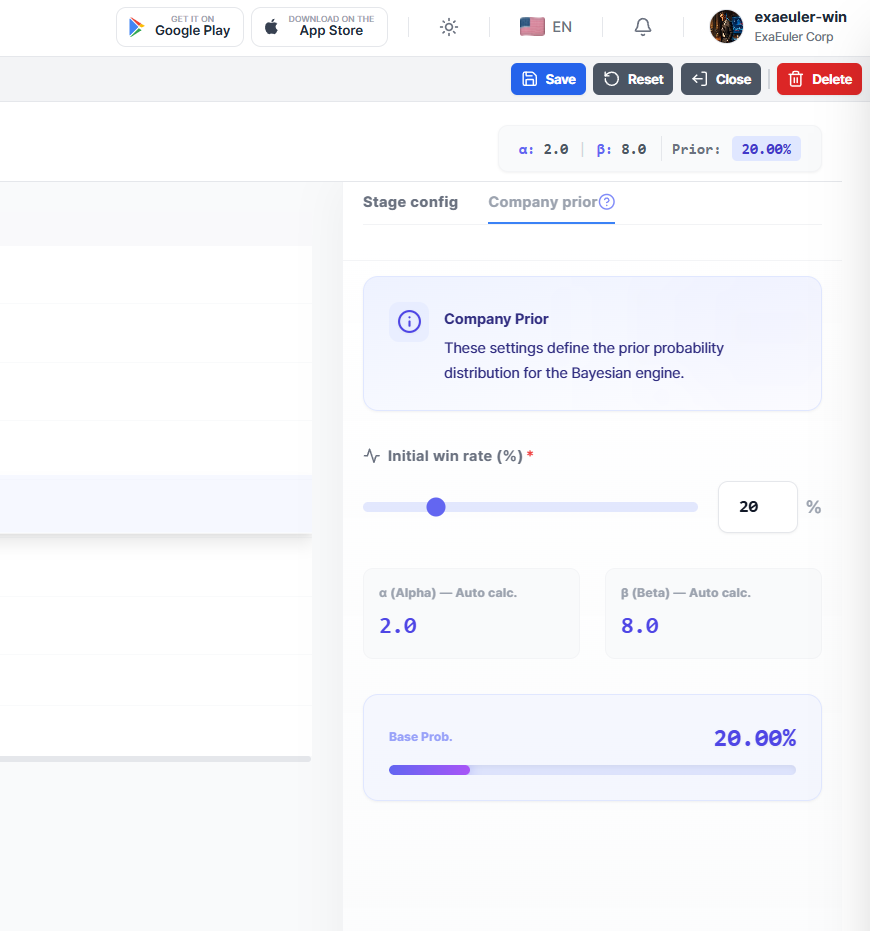
Company Prior (Company Win Rate)
Set the company's default win rate in the Company Prior tab on the right panel.
This value is used as the basis for the Bayesian engine's prior probability distribution, and is applied to the initial win probability calculation for all new projects.
Setup Method
1. Click the Company Prior tab.
2. Adjust the Initial Win Rate slider or enter a number directly. (Range: 5% – 80%)
3. α (Alpha) and β (Beta) values are automatically calculated and displayed:
α = Total Strength × Win Rate / 100β = Total Strength - α
4. The Base Probability progress bar updates in real-time at the bottom.
5. Click the Save button to save.
⚠️ If the Company Prior is not set, the Company Prior tab name is displayed in red. It must be set for the Bayesian engine to work properly.
Parameter Descriptions
| Parameter | Symbol | Description |
|---|---|---|
| Stage Value | SV | Value of the sales stage. Higher values indicate stages closer to contract |
| Stage Weighted Value | SWV | 1 + ln(SV) — Log-scale transformed weight (auto-calculated) |
| Threshold | T | Decision threshold (0.01–0.99). Higher values mean more conservative judgment. When the project's Bayesian posterior probability breaks through the decision threshold, related screens display distinct icons and background colors for visual differentiation |
| Velocity | k | Decision velocity (positive integer). Higher values lead to faster probability convergence |
| Alpha | α | Success parameter of the Beta distribution (auto-calculated from Prior) |
| Beta | β | Failure parameter of the Beta distribution (auto-calculated from Prior) |
Stage Selection Rules for Activity Recording
When recording activities in the Activity Board (both web and mobile), the stage selection dropdown shows all active stages linked to that project. There are two essential principles to understand.
Multiple Meetings Within a Single Stage
In actual sales, it is common to have multiple meetings within a single stage. For example, there could be 3–4 consecutive meetings in the "Proposal" stage — initial presentation, revised proposal discussion, and final demo.
EXAWin naturally supports this. Record multiple activities by selecting the same stage, and the Bayesian engine sequentially updates the probability as each meeting's signal is reflected.
Since the system is designed so that probability doesn't change dramatically per meeting but converges gradually, the more meetings that repeat at the same stage, the more precise the success/failure judgment for that stage becomes.
Stages Should Progress Forward
When recording activities, not going back to a previous stage is the correct usage. While all stages appear in the dropdown, you should select the current stage or the next stage to record activities.
The reason lies in the Bayesian engine's Sequential Update principle:
Each meeting's evidence (signal) stacks on top of the cumulative probability up to the previous meeting. Just like building bricks from bottom to top, the structure is stable when layered in order: 1st floor (Discovery) → 2nd floor (Proposal) → 3rd floor (Negotiation).
If you record an activity at the "Discovery" stage for a project that has already progressed to "Negotiation":
- SWV (Stage Weight) is applied at the lower early-stage value, so even the same signal has reduced impact on probability
- Bayesian update sequence (meeting_seq) gets mixed up, breaking the sequential inference premise
- As a result, P(Win) prediction reliability drops significantly
💡 In sales reality, situations occasionally arise where "we need another initial meeting for internal review." Even in such cases, keep the current stage when recording the activity, and use signals to reflect the change in situation. Stages represent the "current position" in the sales process, so rather than going back, add new evidence at the current position.
Important Notes
⚠️ Deactivating a specific stage excludes it from the stage selection dropdown in the Activity Board.
- Sort Order must be unique within the company. Duplicates will be rejected on save.
- Even after deleting a stage, past projects and activity records that used it are preserved. They are only removed from the screen list, so rest assured existing data will not disappear.
- Company Prior is a global setting applied to the entire company. Per-project tuning is performed in Auto-Tune.
- Click the help button (❓) next to T and k values to view detailed descriptions.